Event 2.0: one-line UnityEvent with cross-scene targets
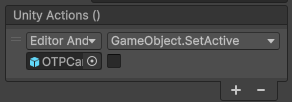

UnityEvent is one of the most useful things in Unity: a designer wires a button to a function without a line of code. It is also one of the most frustrating fields of the inspector: it takes a lot of room, it accepts one argument at most, and it can only point at objects of its own scene.
Event 2.0 (the class is called UnityEssentialEvent) is the event I now use in its place. It is declared and invoked the same way:
[SerializeField] private UnityEssentialEvent _onOpen;

private void Open()
{
    _onOpen?.Invoke();
}
1. It shows more than a UnityEvent can
A UnityEvent only lists the functions with no argument, or with one argument that is an int, a float, a string, a bool or an object. Everything else is hidden from the list. UnityEssentialEvent lists them too.
A bool stays on the line

A call with a single bool keeps one line: its checkbox sits at the end.
Vectors, colours and friends

Vector2, Vector3, Vector4, their Int versions, Color, Quaternion and LayerMask are drawn with their usual fields. Here the event sets Transform.localPosition, which a UnityEvent cannot do.
Enums

An enum argument is a dropdown of its values.
Several arguments

A function can take several arguments, up to ten, each on its own line with its name. Here Transform.LookAt(target, worldUp).
2. One line per call
The display was redone around one rule: a call is one line.
[when] [target] [function] ............ [trash] [+]
On that line: when it runs (play mode or editor too), target, function, a trash button. Hover the name to invoke it right now; right click to copy its calls. On a component with five events, it is the difference between seeing everything and scrolling.
3. Targets in another scene
Unity does not let an object keep a link to an object of another scene. In a project made of several scenes loaded together (a core scene, the UI, a level), that is a daily wall.
I already had a way around it: the GuidComponent, shown in Scene Context Loader. It gives a GameObject an identity that survives closing and reopening scenes. UnityEssentialEvent now uses it by itself: drop an object of another scene on a call and the link is made by its Guid. If the object has no GuidComponent yet, one is added for you.
The colour tells the state: blue, found in another scene; yellow, its scene is not loaded (skipped, with a warning); red, deleted.
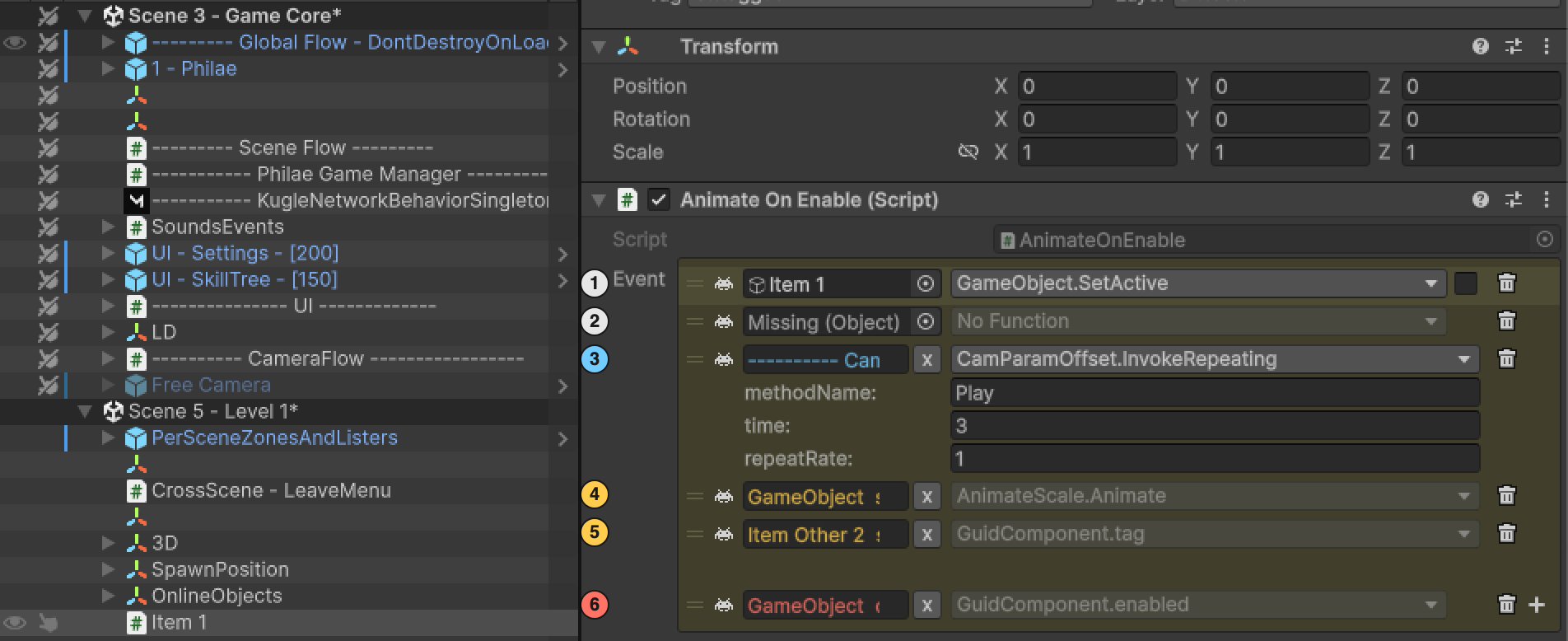
A call on a Guid target is looked up again each time the event is invoked: a target appears with its scene and disappears with it, with no code to write.
PS, attention to detail: drag an object from the hierarchy and drop it on an event with no call, and the first call is created with this object as its target. Same scene: a direct link. Another scene: a Guid link. One gesture in both cases.
UnityEssentialEvent is part of Unity Essentials, my toolbox for the Kugle Corp games. Contact me if you are interested.
See also
- Timeline: easy animations, in the editor and online, synced to the beat: the tool built on top of this event.
- Scene Context Loader: contexts of scenes and the
GuidComponentbehind the cross-scene links.