Intelligent Outline: hold Shift, click exactly what you see
The most frustrating thing when you work on UI in Unity: you click on an image, and Unity selects something else. A transparent panel in front of it. An invisible button. A full-screen blocker that belongs to another scene. So you click again, and again, through thirty elements, to reach the one you were pointing at.
With this tool: hold Shift. The object under the mouse is outlined and named, at once. Click: it is selected. No latency, no time wasted.
It works in edit mode and in play mode, on UI and on 3D objects.
In 2D: the UI you see, not the UI in front of it

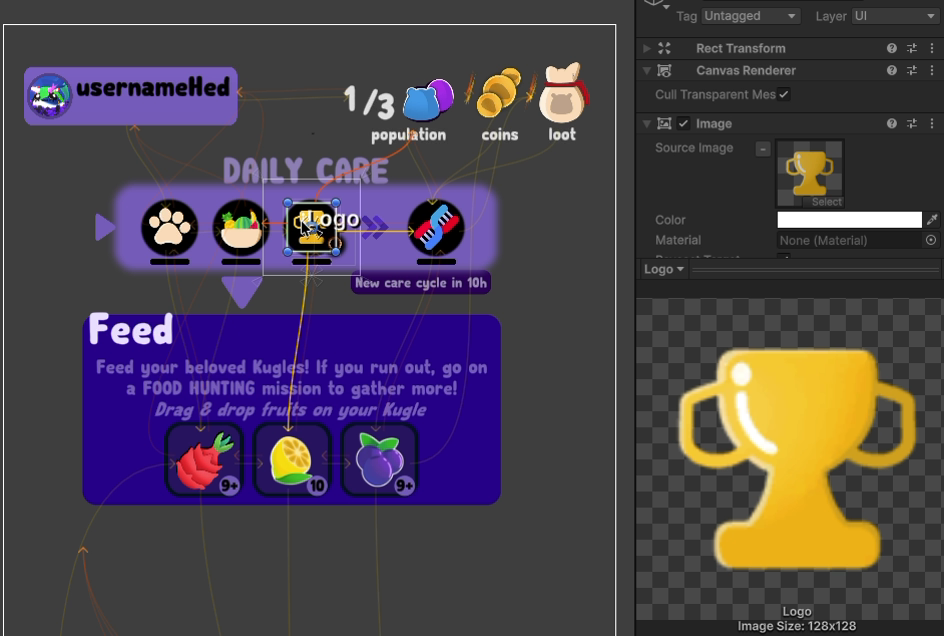
Unity's click gives you the top of the pile. Intelligent Outline gives you the first thing that has a colour under the mouse: even an image transparent at this exact pixel is skipped, across several scenes.
In 3D: the same, on meshes

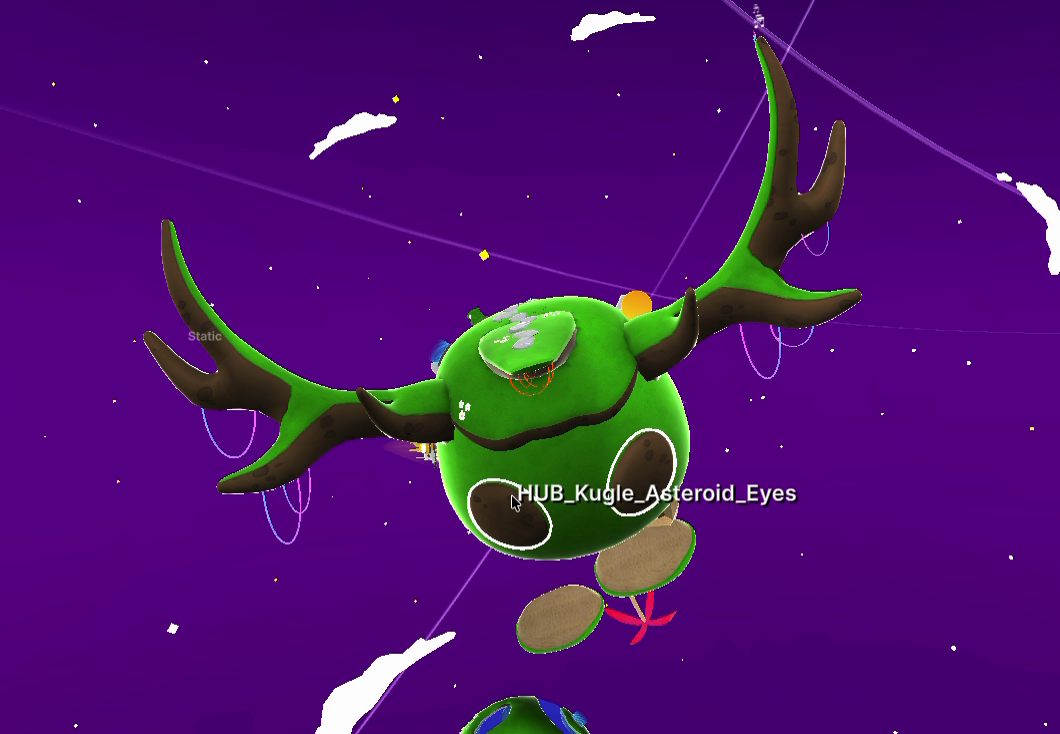
Same key, same behaviour. The mesh under the mouse gets a real outline, drawn by a shader around its shape, and its name. A character made of twenty parts stops being a guessing game: the horn, the eyes, the moss on the back, each one is one Shift away. A renderer that is disabled is skipped, and so is a transparent material where it is see-through.
How it finds the right one
The idea is simple: ask Unity what is under the mouse, and if the answer is not good enough, ask again, without that object.
for (int i = 0; i <= MAX_DEPTH; i++)
{
    if (i != 0)
    {
        // everything already rejected is ignored by the next pick
        _ignoreArray = ExtList.CompactToArray(_alreadyCalculatedToIgnore, _underneethGameObjects);
        clickedGameObject = PickObjectOnPos(mousePosition, _ignoreArray, null);
    }
    ...
    _underneethGameObjects.Add(clickedGameObject);

    // no graphic, transparent, disabled, in a disabled canvas, transparent at this pixel...
    if (MustResearchFurther(clickedGameObject, sceneView))
    {
        continue;
    }
    // here we found something with color!
    ...
}
The "transparent at this pixel" test is the expensive one. The object is rendered alone into a small texture, and the pixels around the mouse are read:
for (int i = (int)mousePosition.x - ACCURACY_MOUSE; i < mousePosition.x + ACCURACY_MOUSE; i++)
{
    for (int k = (int)mousePosition.y - ACCURACY_MOUSE; k < mousePosition.y + ACCURACY_MOUSE; k++)
    {
        Color colorPixel = snapShotData.GetPixel(i, k);
        if (colorPixel != Color.clear)
        {
            return (true);
        }
    }
}
The hard part: Unity's own picking function, by reflection
"Ask Unity what is under the mouse, ignoring this list of objects": Unity can do it. It is how its own Scene view works. But the function was private. No documentation, no public API.
So I went to read the source. Unity publishes the C# side of the editor on GitHub: Unity-Technologies/UnityCsReference. The function is in Editor/Mono/HandleUtility.bindings.cs, and it is called by reflection:
private void FindMethodByReflection()
{
    Assembly editorAssembly = typeof(Editor).Assembly;
    System.Type handleUtilityType = editorAssembly.GetType("UnityEditor.HandleUtility");

    #if UNITY_2022_2_OR_NEWER
    _internalPickClosestGameObject = handleUtilityType.GetMethod("Internal_GetClosestPickingID", BindingFlags.Static | BindingFlags.NonPublic);
    #else
    _internalPickClosestGameObject = handleUtilityType.GetMethod("Internal_PickClosestGO", BindingFlags.Static | BindingFlags.NonPublic);
    #endif

    editorAssembly = typeof(GUIUtility).Assembly;
    handleUtilityType = editorAssembly.GetType("UnityEngine.GUIClip");
    _internalUnclip = handleUtilityType.GetMethod("Unclip_Vector2", BindingFlags.Static | BindingFlags.NonPublic);
}
A private function has no promise attached. It changed with the versions of Unity: its name, its arguments, what it returns, and even where the mouse is. Each time, the tool broke, and each time the answer was in another branch of that repository:
private GameObject PickObjectOnPos(Camera cam, int layers, Vector2 position, GameObject[] ignore, GameObject[] filter, ref int materialIndex, ref bool isEntity)
{
    if (_internalUnclip == null || _internalPickClosestGameObject == null)
    {
        FindMethodByReflection();
        return (null);
    }
#if UNITY_2018_2_OR_NEWER
    position = (Vector2)_internalUnclip.Invoke(null, new object[] { position });
#else
    object[] arguments = new object[] { position };
    _internalUnclip.Invoke(null, arguments);
    position = (Vector2)arguments[0];
#endif

    position = EditorGUIUtility.PointsToPixels(position);
#if UNITY_2021_1_OR_NEWER
    position.y = Screen.height - position.y - cam.pixelRect.yMin - 45f;
#else
    position.y = Screen.height - position.y - cam.pixelRect.yMin;
#endif
    materialIndex = -1;

#if UNITY_2022_2_OR_NEWER
    uint pickingID = (uint)_internalPickClosestGameObject.Invoke(null, new object[] { cam, layers, position, ignore, filter, true, materialIndex, isEntity});
    Object pickedObject = null;
    if (pickingID != 0)
    {
        int instanceID = (int)pickingID;
        pickedObject = EditorUtility.InstanceIDToObject(instanceID);
    }
    return ((GameObject)pickedObject);
#elif UNITY_2020_3_OR_NEWER
    return (GameObject)_internalPickClosestGameObject.Invoke(null, new object[] { cam, layers, position, ignore, filter, true, materialIndex });
#else
    return (GameObject)_internalPickClosestGameObject.Invoke(null, new object[] { cam, layers, position, ignore, filter, materialIndex });
#endif
}
Four versions of Unity, four ways to call the same thing:
| Unity | What changed |
|---|---|
| 2018.2 | the function that converts the mouse position returns its result instead of writing it in its argument |
| 2020.3 | one more argument |
| 2021.1 | the mouse position is 45 pixels off in the Scene view |
| 2022.2 | new name, one more argument, and it returns an id to convert instead of the GameObject |
And all of this before AI. Nobody to ask "which private function does the Scene view use to pick an object in Unity 2022.2?". Only the source code, and a small function that logs every method of a type, to find the one that looks right.
In Unity 6 the private function changed once more (another return type, another type of ignore list), and a public one now does the job with an ignore list: HandleUtility.PickGameObject. The tool uses it. Ten lines of reflection became one line, which is the best end such code can have.
Fast enough to forget it
It runs at most every 0.03 s and remembers what it rejected: you never feel it.
Intelligent Outline is part of Peek and Bookmark, my editor tool on the Unity Asset Store, and of Unity Essentials, the toolbox of the Kugle Corp games.
See also
- Peek and Bookmark: selection history and bookmarks, the tool this one ships with.
- Click and scroll: the same private picking function, used to scroll through the objects under the mouse.
- Build Pipeline: another tool that appears where you already are.