.env files in Unity: passwords out of the code and out of Git
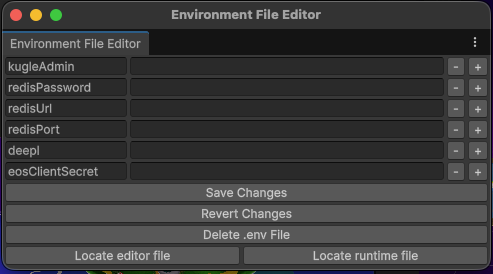
An online game has secrets: the admin password of its API, the address and the password of a database, the keys of the services it calls. They must never be written in the code, and never be pushed to Git.
The answer of the web world is a .env file: one NAME=value per line, next to the project, ignored by Git. This small tool brings it to Unity.
How it works
The .env sits outside Assets, ignored by Git, edited in its own window. In a build the game reads a copy in Resources.
Using it
using UnityEssentials.env;

// a text
if (env.TryParseEnvironmentVariable("kugleAdmin", out string password))
{
    request.SetRequestHeader("Authorization", password);
}

// a number
if (env.TryParseEnvironmentVariable("redisPort", out int port))
{
    Connect(url, port);
}
One function, five types: string, bool, int, float and double. The file is read once, then kept in memory.
Only the builds that need it
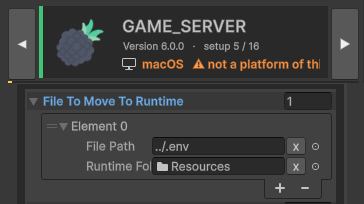
A secret in a game players download is not a secret. So Build Setup copies the file only for the game server and deletes the copy after the build: no way to ship the passwords by mistake.
The reading of the file and the editor window come from the open-source env package by Scott Doxey (MIT licence). In Unity Essentials, its automatic copy at build time is switched off, and Build Setup does it instead, for the builds that ask for it.
See also
- Build Pipeline: 16 builds, two clicks, four stores: what copies the file, and everything else around a build.
- EditorOnly components and actions when building: remove components from the build.