Féérik Games: gameplay & tools programmer
At Féérik Games in Montpellier, the studio behind Eredan Arena and OhMyDollz, I spent six months, in a team of 7, as a gameplay & tools programmer alongside creative director Frédéric Markus, whose career goes through Ubisoft, Nintendo, Rockstar, Disney, LucasArts and Epic Games.
Gameplay on 2 released mobile games: Eredan Arena (1M+ installs on Google Play) and Battle GG. The rest was cinematic games, research & development and fast prototyping: 3 prototypes (Race, a mobile racing game; Viper, a plane game; Planet, a space battle royale) and the tools to build them.
What I did
Gameplay & tools programmer · 6 months- Gameplay on 2 released mobile games, Eredan Arena and Battle GG
- Prototyped Race, a cinematic racing game for mobile, then Viper (plane) and Planet (space battle royale)
- Built a one-shot camera tool on top of Cinemachine, with keyframes along the race spline
- Made the tools work both in Play mode and in the editor, with a custom editor time loop
- Built a global editor window: selection and tooltips in the Scene view, no Inspector needed
- Built the spline-based level design tools: objects locked on the track, 4 rotation modes
Play the action, not the controls
The question behind the racing prototype: on a phone, how do you make players feel like they are in a movie car chase, while their thumb does very little?
We compared the fantasy (what a cinematic race looks like) with the reality (what the player actually controls), and took the "less gameplay, more fun?" road: simple inputs, and the camera and the replay do the storytelling.
A one-shot camera tool
To get cinema-like one-shot sequences, I built a tool on top of Cinemachine to author the whole sequence along the race spline:
- create cameras and preview them in game instantly,
- add keys along the spline: player rotation, slow motion, speed ratio, camera switch, spline changes.
The race keyframe tool
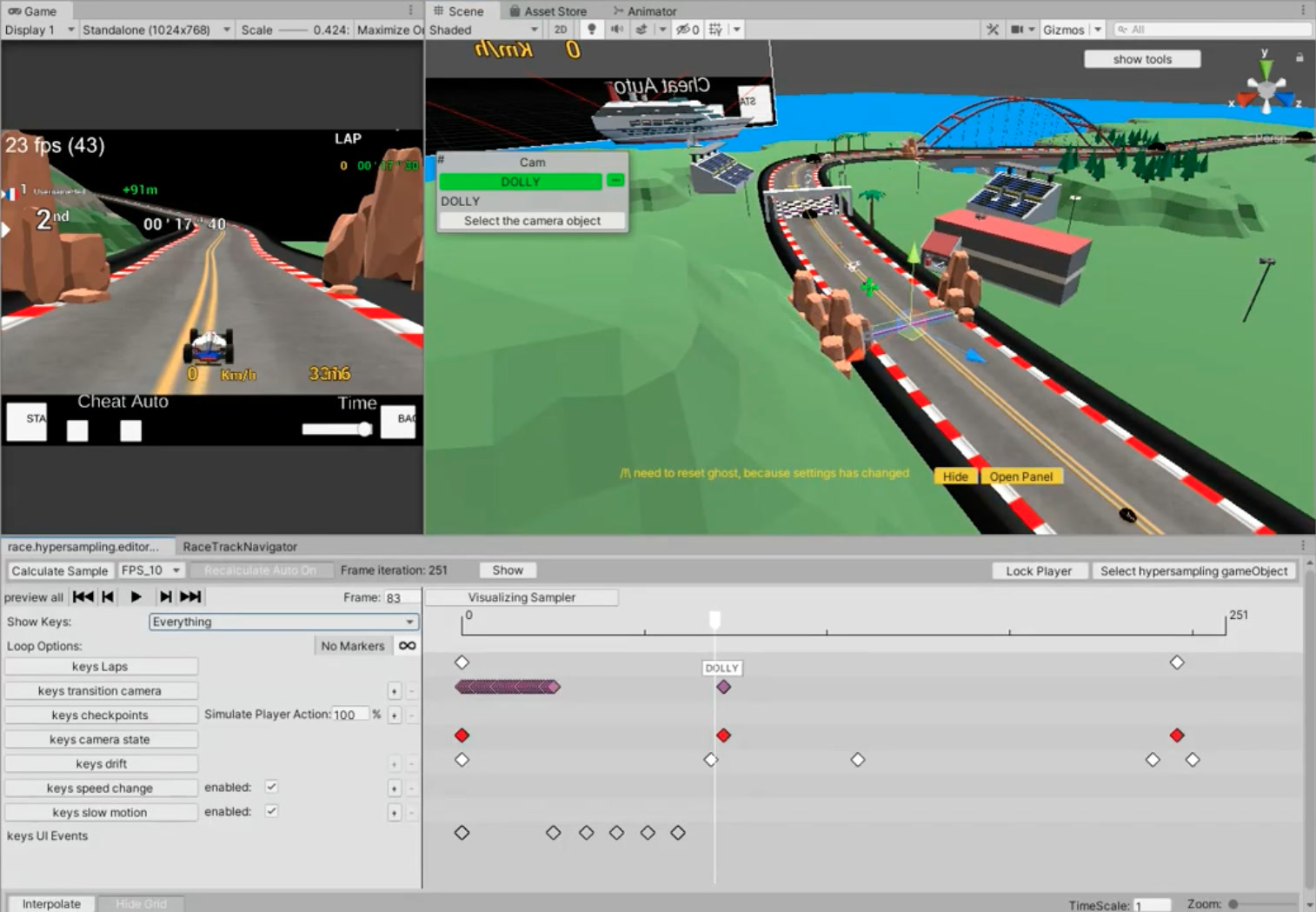
The heart of the toolset: one window drives the whole race in real time. The race is sampled, a ghost car replays it, and every key (camera, checkpoints, drift, slow motion, UI events) sits on one timeline the designer scrubs and edits while the game runs.
Tools that work in Play mode and in the editor
The tools run in Play mode and in the editor, with smooth motion in both, thanks to a custom editor time loop (see Time in the editor).
A global editor
Everything in one place:
- selection and tooltips right in the Scene view, no need for the Inspector or the Hierarchy,
- every editor is wrapped in its own window, which remembers its position.
Level design on the spline
Objects locked on the spline, with 4 rotation modes. The same tools were reused for Viper, a plane prototype.
What I took away
- A broader understanding of how the video game industry works, next to a veteran creative director.
- Editor tools, and a much deeper knowledge of Unity.
- An entertaining approach to gameplay: what the player feels matters more than what they press.
- On the personal side: applied mathematics, and code architecture.